
PlusIPTV+ is an official IPTV subscription issued by the manufacturer for compatible devices — not just an app file (APK). When you buy a PlusIPTV+ subscription from our store, you receive an official activation code that you enter directly in the PlusIPTV+ app on your device.
What is a PlusIPTV+ subscription?
A PlusIPTV+ subscription is a TV streaming service activated with a personal code that you receive after completing your purchase. Enter the code in the PlusIPTV+ app to activate the subscription on your compatible device straight away.

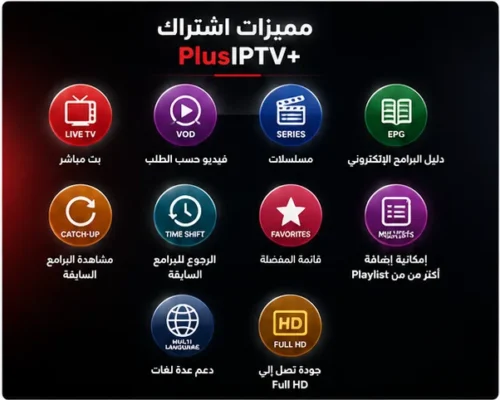
What does PlusIPTV+ offer?
- Live TV — live channels
- VOD — video on demand
- Series — TV series
- EPG — electronic programme guide
- Catch-up — watch past programmes
- Time Shift — go back to earlier programmes
- Favorites — save your favourite channels
- Multiple Playlists — add more than one playlist
- Multi-Language — several languages supported
- Streaming quality up to Full HD
Key features of the subscription
One of the standout features of PlusIPTV+ is Time Shift, which lets you go back to earlier programmes and watch what you missed, where the channel supports it. It also offers live TV, VOD, series, an electronic programme guide, favourites and multiple playlists.

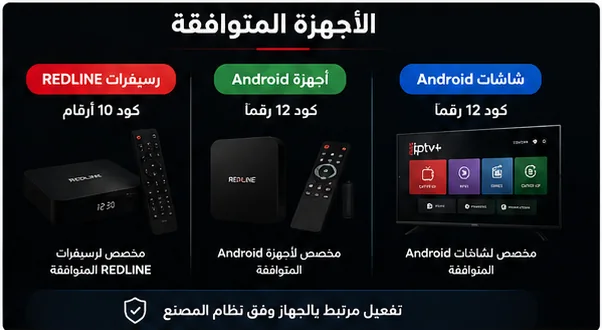
Devices compatible with PlusIPTV+
Redline receivers
The service is designed for Redline receivers that support PlusIPTV+. Activation code for this category: 10 digits.
Android devices
Activation code: 12 digits.
Android screens
Activation code: 12 digits.
Types of activation codes
10-digit code
For Redline receivers compatible with PlusIPTV+.
12-digit code
For compatible Android devices and Android screens.
Choose the right code type for your device before placing your order.
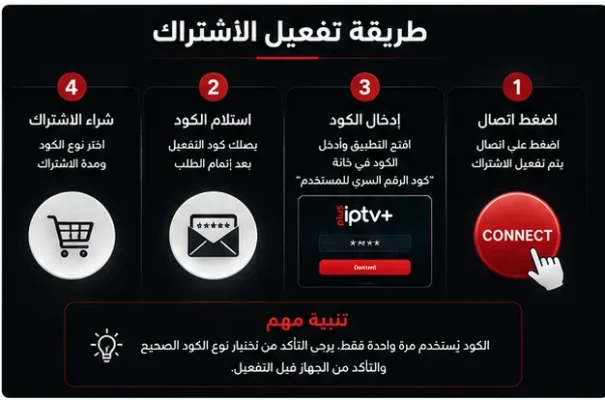
How to activate your PlusIPTV+ subscription

1 – Buy the subscription: choose the code type and the subscription period.
2 – Receive the code: your PlusIPTV+ code arrives once your order is complete.
3 – Enter the code: open the PlusIPTV+ app and enter the code in the user PIN field.
4 – Press Connect: the subscription is activated on your device.
Important: please make sure you choose the correct code type and check your device before activating, as the activation code can only be used once.
Can I renew my subscription?
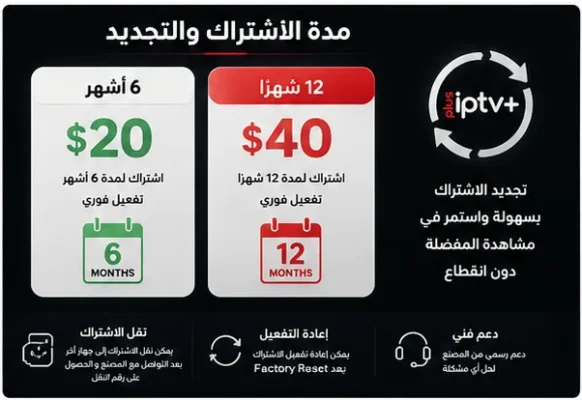
Yes. When your PlusIPTV+ subscription ends, you can renew it by buying a new activation code from our store.

Download the PlusIPTV+ app
You can download the app from this link: click here
Can I move my subscription to another device?
Activation is tied to the device through the manufacturer’s system and the device’s identification data. To move your subscription to another device, contact the manufacturer to get a transfer number and follow the official transfer procedure.
What happens after a Factory Reset?
After a factory reset of the device, the subscription can be activated again.
⚠️ Please make sure you choose the correct code type and check your device before activating, as the activation code can only be used once.
Frequently asked questions
An official IPTV subscription activated with a personal code inside the PlusIPTV+ app.
Available for 6 months or 12 months.
The 10-digit code is for Redline receivers; the 12-digit code is for Android devices and screens.
The 10-digit code.
The 12-digit code.
The 12-digit code.
Open the PlusIPTV+ app, go to the user PIN field, enter the code, then press Connect.
No. Activation works directly with the code you receive — no MAC address needed.
Yes, by buying a new activation code from our store when your period ends.
Contact the manufacturer to get a transfer number and follow the official procedure.
The subscription can be activated again afterwards.
No, the activation code can only be used once.
Yes, it supports live channels.
Yes, it supports video on demand.
Yes, it supports TV series.
Yes, an electronic programme guide is available.
Yes, you can watch past programmes.
It lets you go back to earlier programmes and watch what you missed, where the channel supports it.
Yes, you can save your favourite channels.
Yes, multiple playlists are supported.
Yes, it is multi-language.
Streaming quality is up to Full HD.


Kotaiba Fazaa (verified owner) –