

Original ZAIN TV Subscription | Complete Family & Entertainment Plan (Instant Activation)


Price range: $1,00 through $38,00
Enjoy a world of entertainment with a ZAIN TV subscription:
- ✅ Strongest packages: sports, movies, kids and exclusive series.
- ✅ HD/4K quality: crisp viewing for big screens.
- ✅ Fresh library: the latest episodes and international movies added daily.
- ✅ Wide support: works on LG and Samsung TVs, Android devices and iPhone.
- ✅ No adult channels: a 100% safe family subscription.
- ✅ Instant activation: receive your details on WhatsApp right after payment.
What is a ZAIN TV subscription?
A ZAIN TV subscription is one of the best IPTV services in the Arab world, giving you full access to Arabic and international channels in high quality. The app has a modern, easy interface with a huge library of subtitled movies and series, excellent stability during live matches and full support for all smart and Android devices.
Why is a ZAIN TV subscription the ideal choice for families?

A ZAIN TV subscription brings exciting sports and family entertainment together on one platform. Thanks to its strong servers, it gives you uninterrupted viewing, especially at peak times and during big events.
What the ZAIN TV package includes:
- Live sports: full coverage of all international leagues and tournaments.
- ZAIN Cinema: a huge VOD library.
- Kids’ world: a variety of cartoon channels and meaningful educational content.
- International channels: packages from around the world (USA, Europe and Turkey).
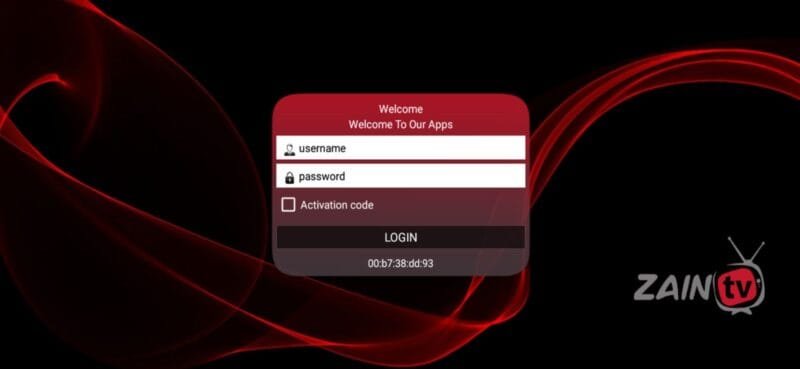
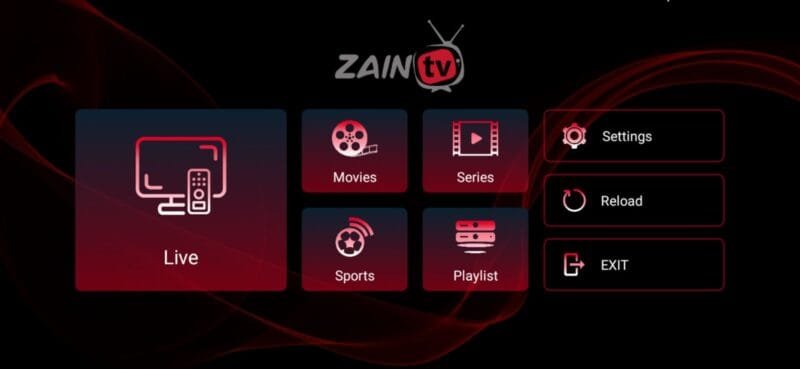
📥 How to download and activate the ZAIN TV app
You can easily download the server’s official app in the following ways:
Method 1: direct download
- Visit https://bluego.us in your device’s browser to download the APK file and install it directly.
Method 2: with the Downloader app
New apps have been added to the Google Play store — please visit the store to see them: click here
How to install the apps on Android TVs: click here
Helpful links for downloading the apps and information about them:
ZAIN TV app download site: https://bluego.us/
App download links and Downloader codes
ZAIN ULTRA — aftv.news/150603
ZAIN 4K — aftv.news/230962
Zain TV — aftv.news/224951
All ZAIN TV server domains
zaintv.me:8080 zain4k.xyz:8080
zaintv.cc:8080 – 2tvs.cc:8080 – 3tvs.cc:8080 – 4z4.xyz:8080 – rosetv.cc:8080
Smarters Pro port
Outside Turkey: 1tvs.xyz:8080
Inside Turkey: http://5tvs.xyz:8080 — 1tvs.xyz:8080
ZAIN TV subscription FAQ
Q: Does the subscription work in every country?
A: Yes, all our subscriptions (Shamna, Blue 4K, ZAIN TV) work in every country (Europe, America, the Gulf and North Africa) without a VPN, with full stability.
Q: How do I download the Shamna or ZAIN TV app?
A: Download it directly from Google Play, through the short link https://bluego.us in your device’s browser, or with the Downloader app using each app’s code to make sure you get the original version.
Q: What internet speed do I need to watch without buffering?
A: For stable 4K, we recommend at least 10 Mbps. For FHD and HD, 5 Mbps is plenty thanks to the advanced compression on our servers.
Q: Can I use the subscription on more than one device?
A: The activation code works on one device at a time. You can switch between your devices (from phone to TV, for example) as long as you close the app on the first device. We also have special packages that support two devices together.
Q: What should I do if I have an activation problem?
A: We offer full technical support on WhatsApp. Once you buy your subscription, contact us and we will help you install and run it on any device you own.
Q: Is the content safe for families and children?
A: Absolutely. Our subscriptions include kids’ packages with the most popular channels and cartoons, and a parental control feature to hide any content you don’t want.
💡 Golden tips for the best performance from your ZAIN TV subscription
To get the most out of your ZAIN TV subscription and avoid technical problems at peak times, we recommend these guidelines for stable viewing:
- Use an Ethernet cable: if you watch on a smart TV, connect the device with a cable rather than Wi-Fi whenever you can, to keep the data flow steady and prevent buffering caused by signal interference.
- Update the apps regularly: always use the latest version of the app — new updates include back-up links that switch on automatically during big matches.
- Restart your router: we recommend restarting your router once a week to clear its memory and improve responsiveness with international servers.
- Choose the right player: on Apple devices, use players that support hardware decoding to improve picture quality and reduce the load on your device.
| Subscription period | 24-hour trial, 3 months, 6 months, 12 months, 15 months, 24 months, 1-month subscription |
|---|
Related products

Subscriptions
Original DTC SAT TV Subscription – Rock-Solid Stability and 4K Quality (Instant Activation)


Subscriptions





Subscriptions

Subscriptions